RaceDay Scoring can collect live reads from Impinj Speedway readers when Impinj Speedway Connect is licensed and sending tag data over TCP. In Streams, that connection is Impinj-Speedway Direct Connect.
This stream connects to Speedway Connect. Impinj does not offer Speedway Connect on R700, R700 v2, or R720 readers. See Impinj’s R700 technical FAQ for more details regarding specific system support for Speedway.
If you use one of those models that is not supported by Speedway, RaceDay Scoring can still score from a file that includes a chip or bib and a time. See Create a Custom File Type Stream Format .
For more information on Impinj/Speedway, please contact them here https://www.impinj.com/about-us/contact-us
Speedway Connect license
You need a paid Speedway Connect license. Without it, Speedway Connect stops after 500 tags. If you see a red license warning in Speedway Connect, live reads will stop once that limit is reached.
For installing and licensing Speedway Connect, use Impinj’s Speedway Connect getting started guide.
Speedway Connect output settings
These settings must match, or RaceDay Scoring will not read the stream.
In Output : Data:
- Format: Key-Value Pairs
- Delimiter: Comma
- Line Ending: CRLF
- Timestamp Format: UNIX Time
- Timestamp: checked
- Antenna Port, Peak RSSI, TID, and User Memory: unchecked
In Output : Connection:
- TCP/IP Socket: checked, Port 14150
- Serial Port, Keyboard Emulation, USB Flash Drive, and HTTP POST: unchecked
Save the Speedway Connect configuration so it comes back after a restart.
RaceDay Scoring connects to the reader (or the computer running Speedway Connect) on port 14150. Speedway Connect listens on that port. Put both devices on the same network.
Speedway Connect Settings Screenshots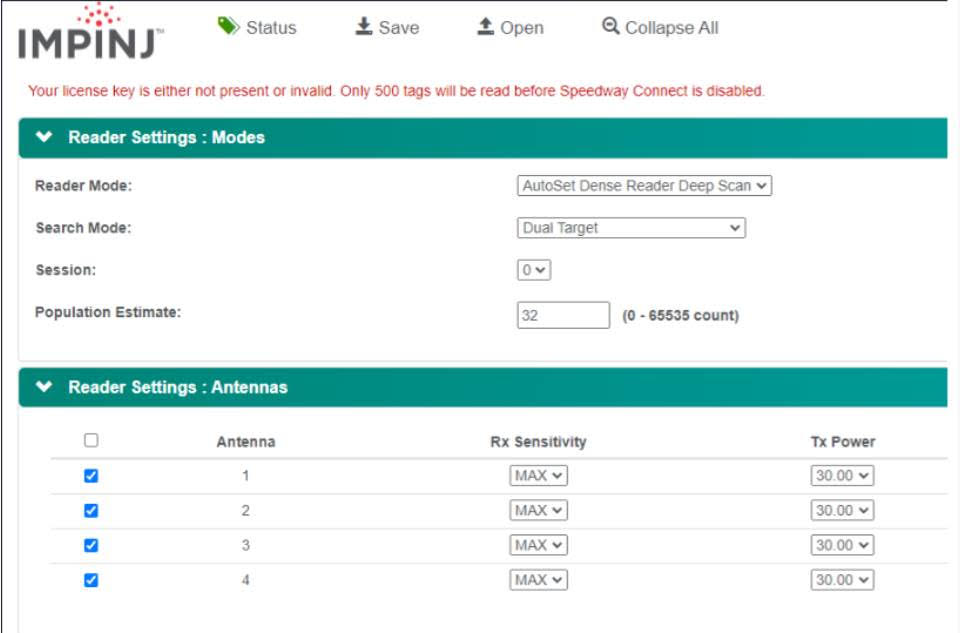
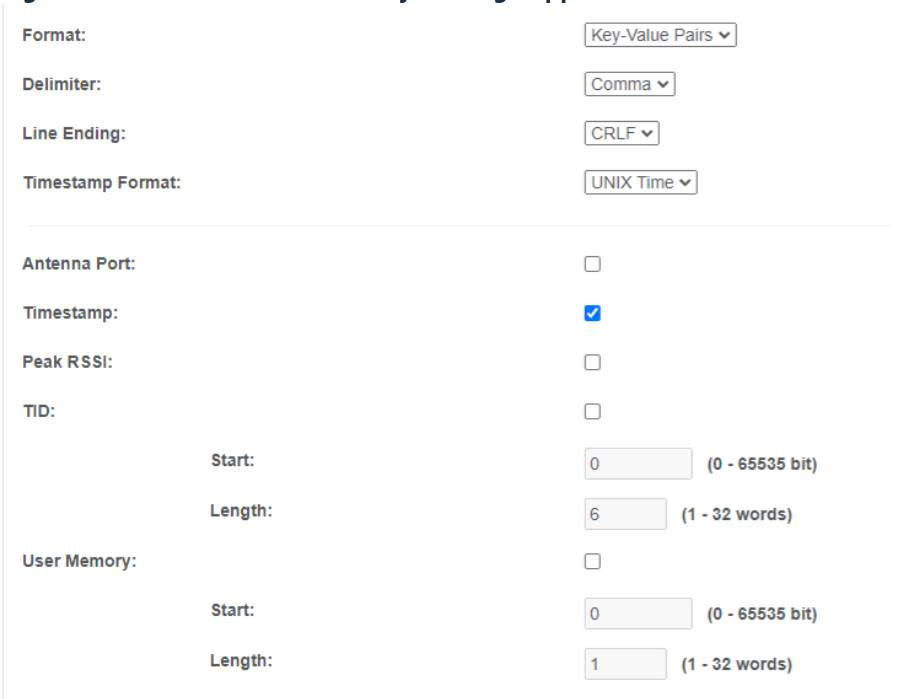
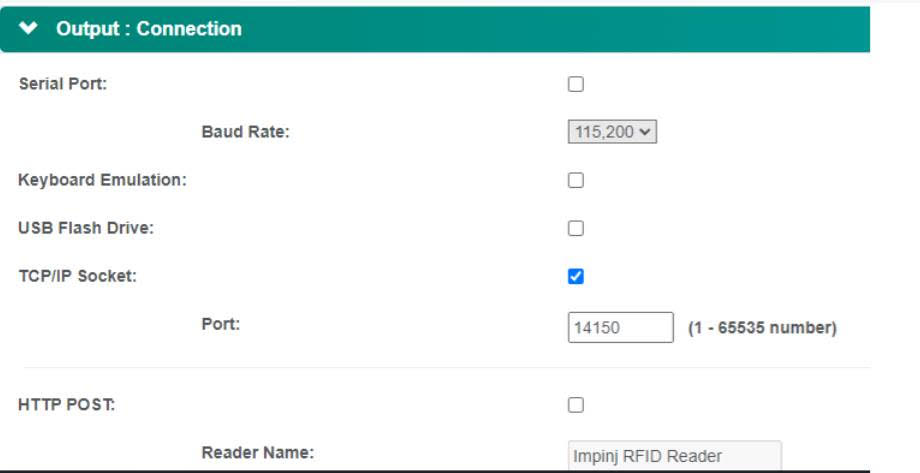
Speedway Connect reader settings
The Mode and Antenna screens below are from a Speedway reader used when this stream was first set up. Use them as a starting point. Antenna count and transmit power depend on your reader and local regulations. They are not what RaceDay Scoring uses to interpret each read.
Add a Stream in RaceDay Scoring
- Go to Streams in the sidebar, then click Add Stream.
- Enter a Stream Name you can reuse, such as Impinj Finish Main.
- Set Stream Type to Impinj-Speedway Direct Connect.
- Enter an Impinj Reader Name. This is for your own reference and shows next to reads from this stream.
- Set Device IP to the IP address of the reader running Speedway Connect.
- Set Device Port to 14150. RaceDay Scoring fills this in by default.
- Assign the stream as a Main Stream on the Timing Location. Chip systems belong on Main Streams. See Assign a Stream to a Timing Location.
- Save the stream.
If Impinj-Speedway Direct Connect is missing from Stream Type, click Settings on the Streams page. In Global Stream Settings, set Chip System to Impinj-Speedway, or clear Chip System so all stream types are listed. See Set a Default Chip System.
Import Chip Assignments so the chip values Speedway Connect sends match your participants. Leave Retain Chip Code Zero Padding off unless your Chip Assignments include leading zeros.
When the stream is assigned, begin collecting reads.